

Getting started with Jevstiller
Jevstiller runs as one service next to yours. Your services keep the TypeSafe SDK and their own Jev keys; only the base URL changes.
1. Run it
Section titled “1. Run it”# an admin token, for the status page and admin commandsexport JEVSTILLER_ADMIN_TOKEN=$(openssl rand -hex 32)docker run -d --name jevstiller -p 8080:8080 \ -v jevstiller-data:/data -e JEVSTILLER_ADMIN_TOKEN \ ghcr.io/tomerglick57/jevstiller:0.6.0The image runs on CPU with the encoder built in, and needs no network except to Jev.
git clone https://github.com/tomerglick57/Jevstillercd Jevstiller# an admin token, for the status page and admin commandsopenssl rand -hex 32 > deploy/admin-token.txtdocker compose up -dThe settings are in deploy/jevstiller.toml. Your other services on the same Compose network reach it at
http://jevstiller:8080.
kubectl create secret generic jevstiller \ --from-literal=admin-token=$(openssl rand -hex 32)REPO=https://raw.githubusercontent.com/tomerglick57/Jevstiller/v0.6.0kubectl apply -f $REPO/deploy/kubernetes/jevstiller.yaml# to try it from your machine:kubectl port-forward svc/jevstiller 8080:8080One replica with a volume for its data; services in the cluster reach it at http://jevstiller:8080.
pip install jevstiller # Python 3.10+; GPU: "jevstiller[gpu]"export JEVSTILLER_ADMIN_TOKEN=$(openssl rand -hex 32)jevstiller serve --data-dir ./jevstiller-dataEvery setting has a working default. For a real deployment (a config file, who may call it, TLS), see Deploy and Configuration.
2. Check it works
Section titled “2. Check it works”curl -s localhost:8080/readyz{"ready":true,"checks":{"manager":true,"encoder":true}}Then send it a real question, with your Jev key:
curl -si localhost:8080/v1/systemone \ -H "Authorization: Bearer $TYPESAFE_API_KEY" \ -H "Content-Type: application/json" \ -d '{"state": "My invoice is wrong", "model": "jev-latest", "questions": {"team": { "type": "choice", "instructions": "Which team handles this?", "criteria": {"billing": "", "technical": "", "other": ""}}}}'HTTP/1.1 200 OKx-jevstiller-source: upstreamx-jevstiller-detail: {"team":"key_unverified"}...{"model":"jev-1.13.0","answers":{"team":{"choice":"billing", ...Jev answered (upstream), and Jevstiller passed its answer through unchanged. key_unverified means this is the
first time it has seen your key: from now on, Jev has accepted it.
3. Point your services at it
Section titled “3. Point your services at it”export TYPESAFE_BASE_URL=http://localhost:8080# from other containers: http://jevstiller:8080That’s the whole change. Code like this keeps working as it is:
import typesafe_sdk as ts
# reads TYPESAFE_API_KEY and TYPESAFE_BASE_URLclient = ts.TypeSafeClient()r = client.system_one( state="Please cancel my subscription", questions={"team": ts.Choice( instructions="Which team should handle this message?", criteria={ "billing": "Charges, invoices, refunds", "technical": "Bugs, errors, things not working", "cancellation": "Wants to cancel or downgrade", "other": "Anything else", })},)r.choices["team"].choice # "cancellation"4. Watch it learn
Section titled “4. Watch it learn”At first, every request goes to Jev with the caller’s key, and Jev’s answer comes back unchanged.
- A question becomes a task once it has been asked 50 times (
admit_after); from then on, each Jev answer is a training row. - A student is trained in the background once there are enough rows per class, then tested on calibration data and in shadow on live traffic.
- Local answers start once the student meets the agreement budget. Requests it isn’t sure about still go to Jev, and so does a random 2%, to keep checking.
Open http://localhost:8080/jevstiller/status in a browser and log in with any user name and the admin token as the password:
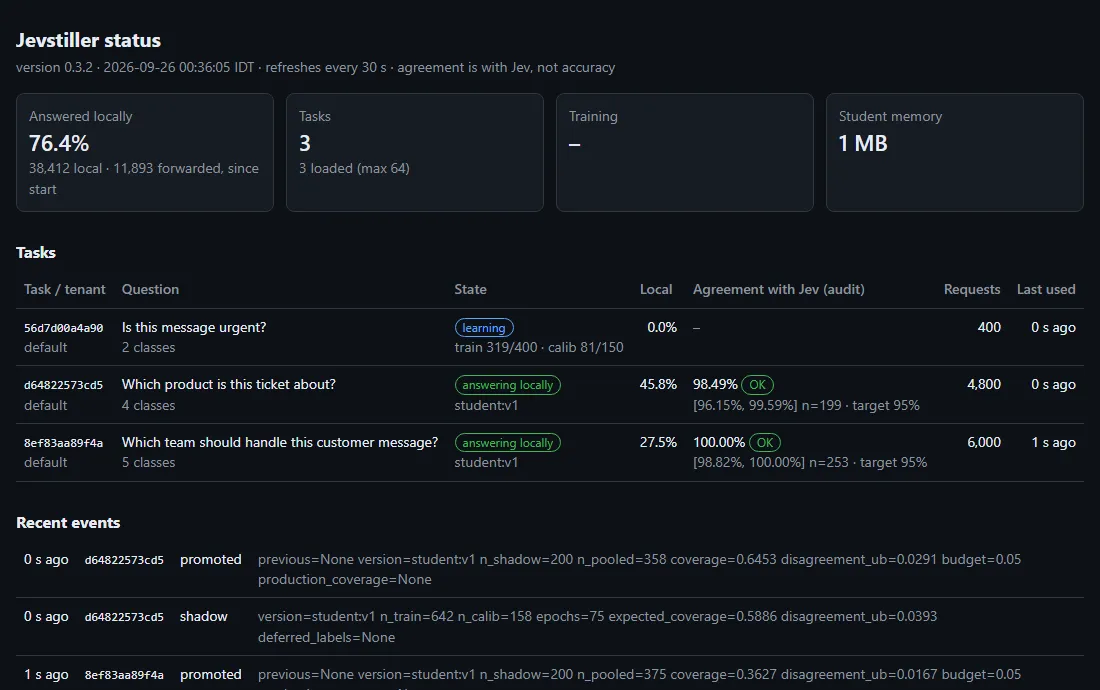
Or from a terminal, next to the server:
docker exec jevstiller jevstiller admin tasksdocker exec jevstiller jevstiller admin status <task key>docker compose exec jevstiller jevstiller admin tasksdocker compose exec jevstiller jevstiller admin status <task key>kubectl exec deploy/jevstiller -- jevstiller admin taskskubectl exec deploy/jevstiller -- jevstiller admin status <task key>jevstiller admin tasks # every task, with its keyjevstiller admin status <task key>Task: 3f1c0a9e2b7d44e1a9c2 version 89a7438c2f7d mode: cascade audit rate 2%Production: student:v3 Shadow: -Requests: 11,083 student 69.8% teacher 30.2%Agreement with teacher (audit, n=415): 99.40% [98.46%, 99.84%] target 98% OK note: agreement with the teacher is not accuracy.The agreement line shows the estimate, its confidence interval, and one of OK, inconclusive or BROKEN; see
the guarantee. For dashboards, GET /metrics serves Prometheus metrics
(Operations).
As a Python library
Section titled “As a Python library”The engine inside the proxy is also a library, for a single task in your own process:
from jevstiller import Jevstiller, Task, load_encoderfrom jevstiller.teachers.jev import JevTeacher
task = Task(    "support_router",    "Which team should handle this message?",    {"billing": "Charges, invoices, refunds",     "technical": "Bugs, errors, things not working",     "cancellation": "Wants to cancel or downgrade",     "other": "Anything else"},    target_agreement=0.98,)js = Jevstiller(task, teacher=JevTeacher(), data_dir="./jevstiller-data",                encoder=load_encoder("small"))
r = js.classify("Please cancel my subscription")r.label, r.source   # ("cancellation", "teacher"), later "student:v3"print(js.status().report())
To try the loop with no API key, a synthetic teacher stands in for Jev:
git clone https://github.com/tomerglick57/Jevstillercd Jevstillerpip install -e .python examples/quickstart_synthetic.py- How it works: the loop, piece by piece.
- The drop-in proxy: what is answered locally, keys, tenancy, errors and limits.
- When to use it, and when not to.